
The DisplayPort™ interface
What is DisplayPort™?
DisplayPort™ is a connection technology universally usable and standardised by VESA (Video Electronics Standards Association). It means a digital interface to transfer video and audio signals.
In contrast to HDMI that is mostly applied at TV and multimedia devices such as video projectors, games consoles and DVD players, DisplayPort™ is mainly used in the area of IT technology, at PC systems and displays.


DisplayPort™ is said to offer more high-performance features than any other digital interface. The technology is developed in order to replace older standards like DVI and VGA. It is stated that DisplayPort™ opens up new possibilities in the fields of computing, digital displays and entertainment-oriented consumer electronics. It is called the standard of the future that is already available today.
Content
The history of DisplayPort™ versions
VERSION 1.0
For the first time in May 2006 the standard's specification is published by VESA.
VERSION 1.1
In April 2007 the first final version is determined. DP 1.1 allows data transfer with two different data rates (HBR and RBR: High Bit Rate und Reduced Bit Rate). The maximum transfer rate when using all lanes and with an up to two meter long cable is 8.64 Gb/s. That is powerful enough for HDTV and bigger displays.
Encoding with HDCP 1.3 (High-bandwidth Digital Content Protection) as well as DPCP (DisplayPort™ Content Protection) serves as copy protection. In this version the Dual-mode DisplayPort™ (shortened: DP++) is also launched, read more about it further down at The feature DP++. First DisplayPort™ devices are available in the beginning of the year 2008.
VERSION 1.2
DP 1.2 is published in December 2009. An important improvement is an increased data transfer rate to a maximum of 17.28 Gb/s when all four lanes are in use. For the first time UHD-1 (4K Ultra HD) resolution is supported as well as MST (Multi Stream Transport). Now it is possible to broadcast several video streams independently of each other and to connect a number of displays by daisy chaining – via a single DisplayPort™ connector.
VERSION 1.3
In the DP version ratified in September 2014, the data rate per lane is increased once more. Now altogether up to 25.92 Gb/s can be transferred. Likewise, the use of several UHD-1 (4K Ultra HD / 3840 x 2160 pixels) or WQXGA displays via MST is possible.
Thanks to integration of the 4:2:0 chroma subsampling, the support of coming UHD-2 displays (8K / 7680 x 4320 pixels) is provided. Dual-mode (DP++), initially implemented in 2007, is modified in a way that it is suitable for HDMI and DVI adapters with 4K Ultra HD resolution (HDMI 2.0) and HDCP 2.2 copy protection.
VERSION 1.4
In March 2016 a version is introduced that, indeed, does not offer an increased data transfer rate but has some features further developed. The Display Stream Compression 1.2 (DSC) offers an up to triple compression rate of the stream that is said to be "visually lossless": that means an average viewer under typical conditions should see no difference between a compressed and an uncompressed image or video.
DSC allows to render UHD-2 (8K / 7680 x 4320 pixels) and HDR as well as UHD-1 (4K / 3840 x 2160 pixels) and HDR. Displays that don't support DSC are only able to render corresponding resolutions, of course. Two additional improvements at DP 1.4 are the Forward Error Correction reducing transmission errors and the expansion of the audio channels to 32.
| WHICH VERSION SUPPORTS WHICH RESOLUTION? | ||||||||||
|---|---|---|---|---|---|---|---|---|---|---|
|
||||||||||
The system of data transfer at DisplayPort™
From a technical point of view, DisplayPort™ has one so called Main Link that consists of four lanes. The data transfer runs in one direction and in a packetized way, making DisplayPort™ the first video interface operating by this principle.
Because, compared to to DVI or HDMI where data transfer proceeds in a continuous way, DisplayPort™ makes use of data packets with fixed rates – in a comparable way to the transmission principle of Ethernet, PCI Express or USB.

The specification Mini DisplayPort™
Mini DisplayPort™ is a smaller version of the DisplayPort™ connector and electronically compatible to it. MiniDP was launched by Apple in October 2008 as a proprietary technology. VESA integrated Mini DisplayPort™ in the DisplayPort™ specification in November 2009.

DisplayPort™ and USB Type-C™
Currently, mobile devices like smartphones, laptops or tablets are equipped with the USB Type-C™ connector more and more. Well, DisplayPort™ is a non-USB-protocol and the DisplayPort™ technology was developed for completely different purposes than the USB Type-C™ technology and both serve various purposes. But during designing the Type-C™ interface it was also placed value on the clever feature to transfer likewise DisplayPort™ signals. So an alternative mode was installed.
The so called DisplayPort™ Alt Mode for USB Type-C™ is equally standardized by VESA. So devices that support the DisplayPort™ Alt Mode can also carry DisplayPort™ signals via the USB Type-C™ port. As an example, a laptop supporting DisplayPort™ Alt Mode can be connected to a DisplayPort™ display. In this case, a suitable tool of choice is an adapter USB Type-C™ plug to DisplayPort™ jack, for example.

It is to note: unfortunately, not all devices that support DisplayPort™ Alt Mode are marked in an appropriate way. But, as the DisplayPort™ organization states, most of the video devices with USB Type-C™ connector available in 2016 are already equipped with DisplayPort™ Alt Mode support. Typically, all products labelled with Video over USB Type-C™ do support it.
The feature MST
What is MST?
As of DisplayPort™ version 1.2 (December 2009), a second transmission mode, Multi Stream Transport Mode (MST), is added in addition to Single Stream Transport Mode (SST). What is the difference between Single and Multi Stream Transport Mode?
In SST, only one screen content can be displayed, even when two monitors are connected. Thus, the screen content is displayed in mirroring mode. MST, on the other hand, allows multiple monitors to operate independently from a single DisplayPort™ port. This means that the connected monitors can display different content. This mode is called Expand. One possibility is that the monitors support daisy-chaining*. Alternatively, a DisplayPort™ MST hub can be used, but the number of connected monitors is limited by the data transfer rate of the DP interface.
* Daisy chaining: Several peripheral devices (e.g. displays) are connected in series, in the form of a chain. The output of a device is linked with the input of the next device.
The matter of the bandwidth
The bandwidth of a single DisplayPort™ 1.2 connection is restricted. So only a limited number of displays with a limited range of supported resolutions can be connected and used via an MST hub. Here again it depends on resolution of each display, timing and refresh rate.
| WHICH RESOLUTION NEEDS WHICH BANDWIDTH? | ||||||||||||||
|---|---|---|---|---|---|---|---|---|---|---|---|---|---|---|
|
||||||||||||||
Bandwidth & display configuration Example #1
Three displays with 2560 x 1440 @ 60 Hz each are connected to the graphics card through an MST splitter. Every display needs 35 % bandwidth. So altogether they require 105 % what results in one of the displays will be deactivated.

Bandwidth & display configuration Example #2
Two MST splitters are linked with the graphics card. Three displays with 1920 x 1080 @ 60 Hz each are connected to splitter 1. Every single display uses 22 % bandwidth and added together they consume 66 % bandwidth of splitter 1. Also three displays with different resolutions are connected to splitter 2. Altogether they need 79 % bandwidth of splitter 2. So in this example the connection of six displays to one graphics card with two outputs is ensured as well as the adequate supply with bandwidth for the displays.
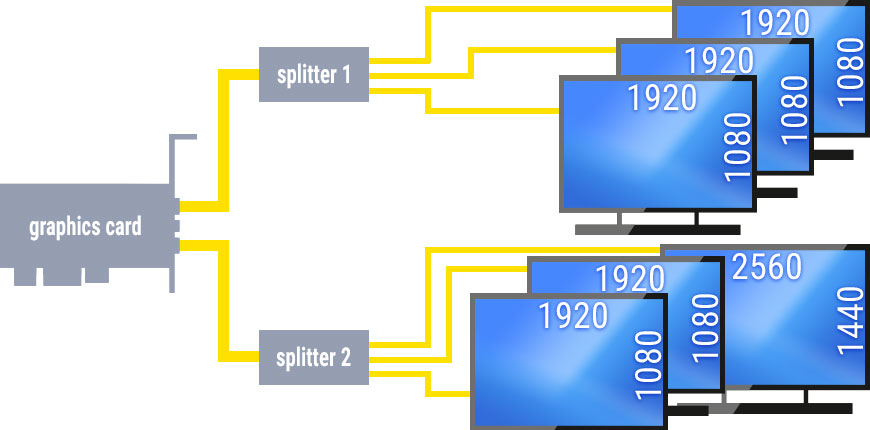
Up to two MST splitters can be used on a single graphics card as long as it has two outputs. Then again, it depends on the number of display pipes on the graphics card how much displays can be supported. If the number of available display pipes is not clearly to determine, the manufacturer of the graphics card should be contacted. DisplayPort™ MST splitters also enable to use all connected displays, independently of each other, as an extended desktop.
The feature DP++
1. Compatibility via passive adapters
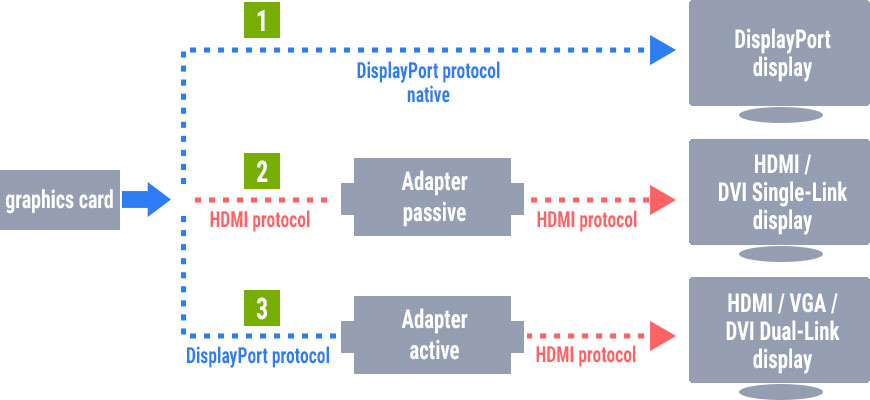
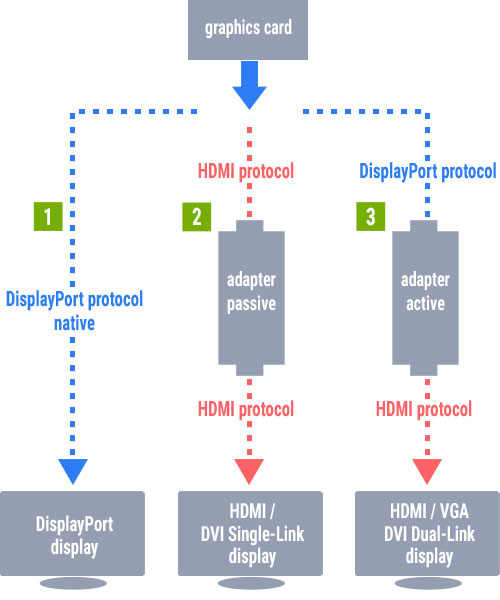
The Dual-Mode DisplayPort™ or DisplayPort™++, shortened DP++, enables compatibility to DVI and HDMI. So the connection via relatively economy-priced adapters is provided. The adapter has only to adjust the electrical signalling layer from LVDS at DisplayPort™ to TMDS at HDMI / DVI. The PC graphics card is involved here because when it identifies the connected device as a device with DisplayPort™ interface, the signals are outputted also in this format.
But if for example an adapter to HDMI is connected, the graphics card is instructed to use the HDMI protocol. Then the downstream passive adapter (so called impedance transformer / level shifter) adjusts the different signal levels and impedances LVDS or TMDS always congruent with the target interface. However, the support of DP++ and an appropriate labeling on devices is optional and depends on the manufacturers.
2. In which case is an active adapter needed?
A limitation of DP++ is its ability to transfer only Single-Link DVI (and HDMI), for the simple reason that there are not enough pins in the DisplayPort™ connector for Dual-Link connections. Indeed, Dual-Link DVI and analogue VGA can be connected but in this case an active adapter is required. Towards the imaging device, an active adapter signifies itself as signal aim (= display) and towards the images receipting device as signal source.
DisplayPort™ product examples by Delock

Item 62623
Adapter mini DisplayPort™ 1.1 male to DisplayPort / HDMI / DVI female passive
Connectors:
1 x mini DisplayPort™ 20 pin male
1 x DisplayPort 20 pin female
1 x HDMI-A 19 pin female
1 x DVI 24+1 female with nuts
DVI-D (Single Link), VGA not wired
Resolution up to 1920 x 1200 / 1080p @ 60 Hz Hz (depending on hardware / system)
1 x ferrite core
Cable length: ca. 16 cm (without connectors)

Item 63312
Adapter USB Type-C™ male to DisplayPort™ female (DP Alt Mode) 4K 60 Hz
Connectors:
USB Type-C™ male >
DisplayPort™ 20 Pin female
Resolution up to 4096 x 2160 @ 60 Hz (depending on hardware / system)
Gold-plated connectors
1 x ferrite core
Cable lenght: ca. 20 cm (without connectors)
Item 64120
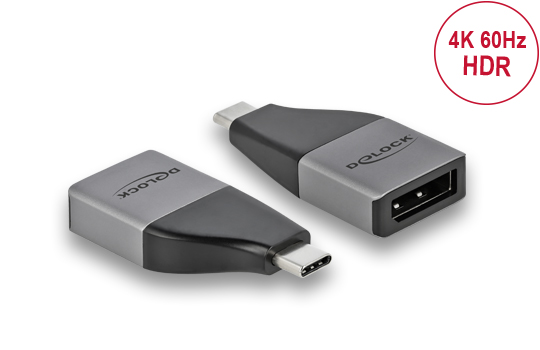
Adapter USB Type-C™ male to DisplayPort™ female (DP Alt Mode) 4K 60 Hz - compact design
Connectors:
USB Type-C™ male
DisplayPort™ 20 pin female
Resolution up to 3840 x 2160 @ 60 Hz (depending on hardware / system)
Dimensions (LxWxH): ca. 41 x 22 x 9 mm

Item 85658
Cable DisplayPort™ to DisplayPort™ 8K
Connectors:
DisplayPort™ 20 pin male >
DisplayPort™ 20 pin male
DisplayPort™ 1.4 specification
DisplayPort® DP 8K certified cable
Resolution up to 8K Ultra HD (depending on hardware / system)
Data transfer rate up to 32.4 Gbps
Gold-plated connectors
Triple shielded cable
Copper conductor
Cable Ø ca. 4.5 mm / cable gauge: 34 AWG
Length: 1 m (incl. connectors)
Also available with lengths
Item 85660 2 m
Item 85661 3 m
Item 85663 5 m
Item 84927
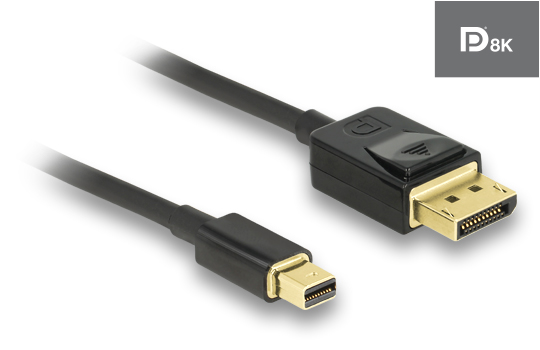
Cable Mini DisplayPort™ to DisplayPort™ 8K
Connectors:
Mini DisplayPort™ 20 pin male >
DisplayPort™ 20 Pin male
DisplayPort™ 1.4 specification
DisplayPort® DP 8K certified cable
Resolution up to 8K Ultra HD (depending on hardware / system)
Data transfer rate up to 32.4 Gbps
Gold-plated connectors
Triple shielded cable
Copper conductor
Cable Ø ca. 4.5 mm / cable gauge: 34 AWG
Length: 1 m (incl. connectors)
Also available with length
Item 84928 2 m
Item 84876
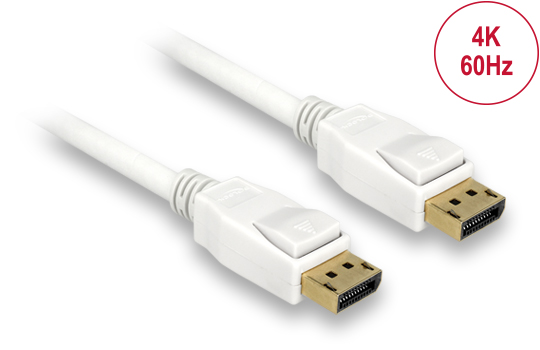
Cable DisplayPort™ male to DisplayPort™ male 4K
Connectors:
DisplayPort™ 20 Pin male >
DisplayPort™ 20 Pin male
DisplayPort™ 1.2 specification
Resolution up to 3840 x 2160 @ 30 Hz (depending on hardware / system)
Data transfer rate up to 21.6 Gb/s
Gold-plated connector
Dreifach geschirmtes Kabel
Cable Ø ca. 7.3 mm / cable gauge: 28 AWG
Copper conductor
Length: ca. 1 m (incl. connectors)
Also available in lengths:
Item 84877 ca. 2 m
Item 84878 ca. 3 m
Item 84879 ca. 5 m
Item 83473
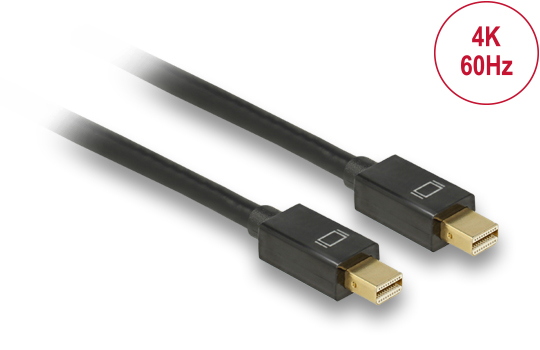
Cable Mini DisplayPort™ male to Mini DisplayPort™ male 4K
Connectors:
mini DisplayPort™ 20 Pin male >
mini DisplayPort™ 20 Pin male
DisplayPort™ 1.2 specification
Resolution up to 3840 x 2160 @ 30 Hz (depending on hardware / system)
Data transfer rate up to 21.6 Gb/s
Contacts gold-plated
Net shielding
Cable Ø ca. 5.5 mm / Cable gauge: 32 AWG
Copper conductor
Length: ca. 1 m (incl. connectors)
Item 87720
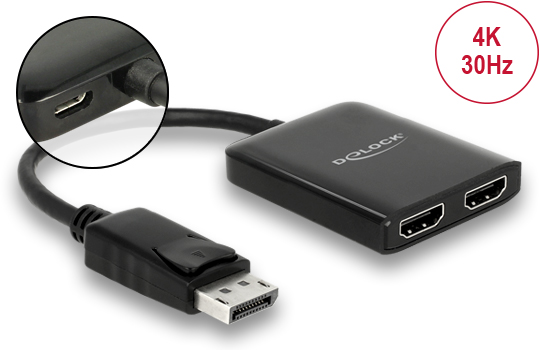
Splitter 1 x DisplayPort™ 1.2 in > 2 x HDMI out 4K 30 Hz
Connectors:
Input
1 x DisplayPort™ 20 pin male
1 x USB Typ Micro-B female (5 V power supply)
Output
2 x HDMI-A 19 pin female
Active converter, Single / Multi Stream Transport Hub (SST / MST)
Resolution up to 2560 x 1440 @ 60 Hz / 3840 x 2160 @ 30 Hz
Cable length: ca. 25 cm (without connectors)
Dimensions (LxWxH): ca. 61 x 49 x 11 mm
Item 87737
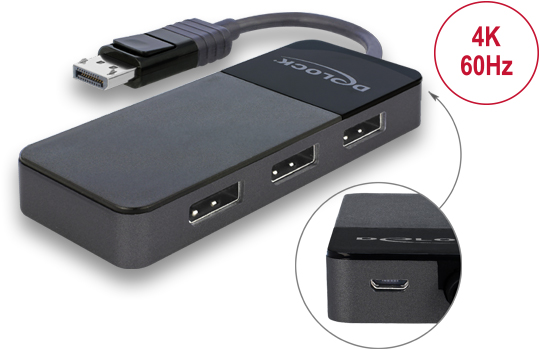
Splitter 1 x DisplayPort™ 1.4 in to 3 x DisplayPort™ out
Connectors:
Input
1 x DisplayPort male
1 x USB Type Micro-B female (5 V power supply)
Output
3 x DisplayPort female
Active converter, Single- / Multi-Stream Transport hub (SST / MST)
Max. resolutions (depending on hardware / system)
DisplayPort 1.4 Multi-Stream Transport (MST) + DSC:
2 Displays: up to 5120 x 2880 @ 60 Hz
3 Displays: up to 3840 x 2160 @ 60 Hz
Cable length: ca. 12.5 cm (without connectors)
Dimensions (LxWxH): ca. 105 x 43 x 14 mm
Item 11482
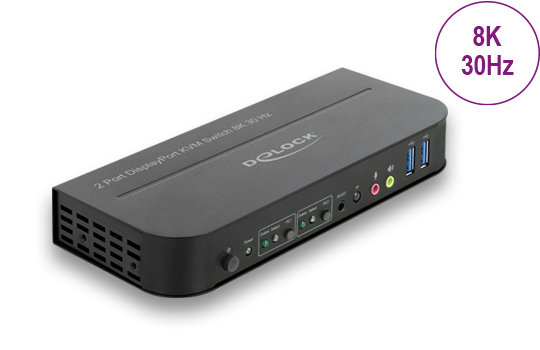
DisplayPort™ 1.4 KVM Switch 8K 30 Hz with USB 3.0 and Audio
Connectors:
Input
2 x DisplayPort female
2 x USB 3.0 Type-B female
4 x 3.5 mm 3 pin stereo jack female (audio)
1 x 3.5 mm 3 pin stereo jack female for optional IR-receiver
1 x DC 5 V power connector screwable
Output
1 x DisplayPort female
1 x HDMI-A female
2 x USB 3.0 Type-A female (USB 3.0 Hub)
2 x USB 2.0 Type-A female (keyboard + mouse)
4 x 3.5 mm 3 pin stereo jack female (audio)
Max. resolutions (depending on hardware / system)
DisplayPort output:
7680 x 4320 @ 30 Hz
3840 x 2160 @ 120 Hz
2560 x 1440 @ 144 Hz
HDMI output: 3840 x 2160 @ 60 Hz
Switching via button, mouse button, hotkey or infrared remote control
Dimensions (LxWxH): ca. 178 x 75 x 26 mm